


TL;DR:
- Refurbished MacBooks are professionally restored devices that are nearly like new and save money compared to new units. Apple Certified Refurbished models come with new batteries, shells, and extensive testing, while third-party options vary in quality and warranty. Properly chosen refurbished MacBooks offer reliable performance, long-lasting use, and significant cost savings, especially when protected by warranty options like AppleCare+.
Refurbished MacBooks are professionally restored laptops that function like new while delivering substantial cost savings over retail price. The industry term for the best category is “Apple Certified Refurbished,” a program where Apple replaces key components, runs full functionality tests, and backs the device with a one-year warranty. If you are asking whether a refurbished MacBook is good, the short answer is yes, provided you buy from the right source. This guide covers what the refurbishment process actually involves, how performance compares to new units, what savings and warranty protections you can expect, and what to check before you buy.
Are refurbished MacBooks good enough to replace a new one?
Refurbished MacBooks are a distinct product category, not simply used or secondhand laptops. The word “refurbished” covers a wide range of quality levels, which is why understanding the source matters more than the label itself. At the top of the market sits Apple Certified Refurbished, and below that sits a broad range of third-party refurbishers with varying standards.

Apple Certified Refurbished MacBooks come with a new battery, a new outer shell, a new power adapter, and the latest compatible macOS installed. That means the physical condition is essentially new, not just cleaned up. Apple also runs every unit through extensive functional testing before it ships.
Third-party refurbishers vary widely. Some match Apple’s standards closely, while others do minimal testing and offer short or no warranty coverage. The variability in third-party practices is the single biggest risk in the refurbished market. Buying from a certified or well-reviewed reseller removes most of that risk.
Pro Tip: Always check whether the seller lists exactly which components were replaced. A legitimate refurbisher will tell you. If the listing is vague, treat it as a red flag.
What separates certified refurbished from used
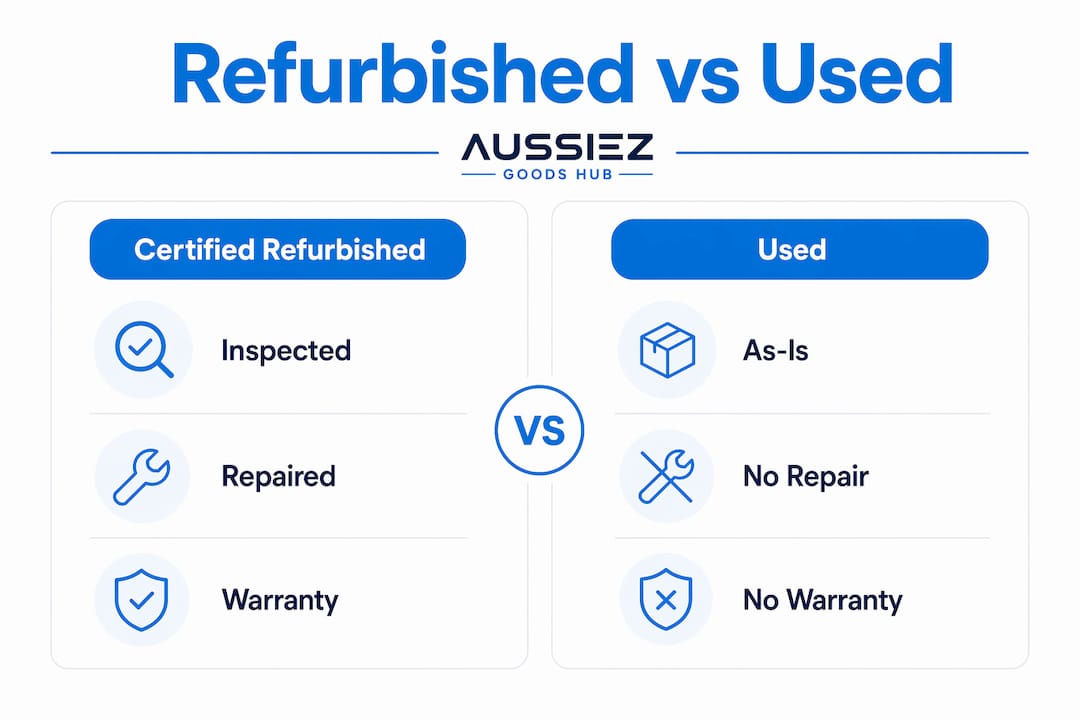
A used MacBook is sold as-is. A certified refurbished MacBook has been inspected, repaired, and tested to a defined standard. The battery replacement alone is significant because battery degradation is the most common reason older MacBooks feel sluggish. When Apple replaces the battery and shell, you are getting the two most wear-prone components fresh.
How do refurbished MacBooks perform compared to new ones?
Performance is the question most buyers care about most. Certified refurbished MacBooks perform identically to new units because the hardware is the same and the software is current. The refurbishment process does not alter processing speed, memory, or storage performance.
The more relevant performance question is about chip generation. A refurbished MacBook Pro with an M3 chip will outperform a refurbished MacBook Air with an Intel Core i5, regardless of condition. Choosing the right model matters more than whether it is new or refurbished.
| Model type | Chip generation | Expected longevity | Best for |
|---|---|---|---|
| Certified refurbished, Apple Silicon | M1, M2, M3, M4 | 7–10 years | Primary device, heavy workloads |
| Certified refurbished, Intel | Core i5 / i7 | 3–5 years remaining | Light use, secondary device |
| Third-party refurbished, Apple Silicon | M1, M2, M3 | 6–9 years | Budget buyers with warranty check |
| Third-party refurbished, Intel | Core i5 / i7 | 2–4 years remaining | Casual use only |
Older Intel-based MacBooks carry a specific risk that goes beyond performance. Apple is actively phasing out support for Intel models, meaning future macOS security updates may not reach them. An unsupported machine becomes a security liability, not just a slow one.
Battery life and real-world use
Apple Silicon MacBooks deliver significantly longer battery life than their Intel predecessors. A refurbished M2 MacBook Air with a fresh battery will outperform a brand-new Intel MacBook Air in everyday tasks. That gap matters for anyone who works away from a desk regularly.
What cost savings and warranty protections do refurbished MacBooks offer?
The financial case for buying refurbished is strong. Apple Certified Refurbished MacBooks offer savings of 15–40% off retail prices. Third-party certified resellers can push that figure to up to 70% off retail, though the trade-off is less predictable quality control.
Those savings are not trivial. On a MacBook Pro that retails at $1,999, a 30% discount saves $600. That is enough to buy a quality USB-C multi-adapter dock and still come out ahead.
Warranty coverage is where certified programs earn their premium:
- Apple Certified Refurbished includes a one-year limited warranty and a 14-day return policy, matching what new MacBooks receive.
- AppleCare+ can be purchased within 60 days of buying a refurbished MacBook, extending coverage and adding accidental damage protection.
- Third-party resellers offer variable coverage, ranging from 90-day warranties to full one-year plans. Always read the terms before buying.
- Return windows on certified purchases typically run 14 to 30 days, giving you time to verify the device works as described.
The warranty gap between Apple Certified and unverified third-party sellers is significant. A $200 saving that comes with no warranty is not a deal. It is a gamble.
Pro Tip: If you buy from Apple Certified Refurbished, add AppleCare+ within the 60-day window. The accidental damage coverage alone is worth it for a laptop you plan to use daily.
What should buyers consider before purchasing a refurbished MacBook?
Buying a refurbished MacBook is a good decision when you approach it with the right checklist. Skipping any of these steps is where buyers run into problems.
-
Check the seller’s certification and reputation. Apple’s own refurbished store is the safest option. For third-party sellers, look for verified reviews, clear warranty terms, and a stated return policy before committing.
-
Avoid very old Intel models. A MacBook from 2017 or 2018 may already be approaching the end of its macOS support window. Buying one now means you could lose security update eligibility within a year or two.
-
Compare refurbished prices with entry-level new models. Sometimes a new base-model MacBook Air costs only slightly more than a refurbished mid-tier model from two years ago. Run the numbers before assuming refurbished is always cheaper.
-
Inspect the condition grade. Sellers use grades like “Grade A,” “Grade B,” or “Excellent” to describe cosmetic condition. Grade A typically means no visible scratches. Grade B may have minor marks. Understand what you are getting before it arrives.
-
Match the model to your intended use. A refurbished MacBook Air M2 handles writing, browsing, and video calls without effort. Video editing, 3D rendering, or software development calls for a MacBook Pro with more RAM and a higher-tier chip. Buying more machine than you need wastes money. Buying too little frustrates you daily.
Refurbished MacBooks typically last 7 to 10 years when properly selected and maintained. That longevity makes the purchase efficient, not just affordable. A well-chosen refurbished MacBook Pro can serve as a primary device for nearly a decade.
Pro Tip: Before buying, ask the seller for the battery cycle count. Apple recommends replacing MacBook batteries after 1,000 cycles. A certified refurbished unit should have a fresh battery, but it is worth confirming.
Key Takeaways
Refurbished MacBooks are a reliable, cost-effective purchase when bought from Apple Certified Refurbished or a reputable third-party seller with a clear warranty and return policy.
| Point | Details |
|---|---|
| Certified refurbished equals new performance | Apple Certified units pass full functional tests and include a new battery, shell, and adapter. |
| Savings range from 15% to 70% | Apple Certified saves 15–40%; third-party certified resellers can reach up to 70% off retail. |
| Warranty protection is available | Apple’s one-year warranty applies, and AppleCare+ can be added within 60 days of purchase. |
| Avoid older Intel models | Intel MacBooks face limited future macOS support, reducing their long-term value significantly. |
| Longevity justifies the purchase | Properly selected refurbished MacBooks last 7 to 10 years, making them efficient long-term buys. |
Why I stopped hesitating about buying refurbished
The first refurbished MacBook I recommended to someone close to me was a certified unit from Apple’s own store. I was cautious at the time, mostly because the word “refurbished” carries an unfair stigma. Two years later, that machine still runs without a single issue. That experience changed how I think about the refurbished market entirely.
The mistake most buyers make is treating “refurbished” as a synonym for “worn out.” It is not. A certified refurbished MacBook with a replaced battery and shell is, in most measurable ways, a new machine at a lower price. The stigma exists because people confuse certified refurbished with secondhand marketplace listings, and those are completely different products.
My honest take: if you are buying from Apple Certified Refurbished, you are getting one of the best value propositions in consumer tech. If you are buying from a third-party seller, do your homework. Check the warranty, read the reviews, and confirm what was replaced. The savings are real, but so is the variability. For most buyers, a refurbished MacBook Air or MacBook Pro with an Apple Silicon chip is the right call. It delivers the performance you need, the longevity you want, and a price that leaves room in your budget for the accessories that make daily use better.
— Samrudha
Gear up your MacBook with Aussiezgoodshubs
A refurbished MacBook is a great foundation. The right accessories make it a complete setup.
Aussiezgoodshubs carries a range of tech accessories built for MacBook users who want a cleaner, more connected workspace. The iQuick T5 wireless charger stand keeps your iPhone, AirPods, and Apple Watch charged without cable clutter on your desk. For connectivity, the 6-port USB-C hub adds HDMI, RJ45, and USB 3.0 ports to any modern MacBook in seconds. You can also keep your device in top condition with a keyboard cleaning kit designed for electronics. Browse the full range at Aussiezgoodshubs and find what fits your setup.
FAQ
Are refurbished MacBooks as reliable as new ones?
Yes. Apple Certified Refurbished MacBooks pass the same functional tests as new units and include a new battery, outer shell, and power adapter. Reliability is comparable to buying new from Apple directly.
Is it worth buying a refurbished MacBook from a third-party seller?
It can be, but only if the seller offers a clear warranty of at least 90 days, lists which components were replaced, and has verified customer reviews. Without those protections, the savings carry real risk.
Should I buy a refurbished Intel MacBook in 2026?
Avoid it unless the price is very low and your use case is minimal. Intel MacBooks are losing macOS security update support, which limits their safe usable life to a few more years at most.
How long does a refurbished MacBook last?
Refurbished MacBooks typically last 7 to 10 years when properly selected. Choosing an Apple Silicon model from a certified seller gives you the best chance of reaching that upper range.
Can I add AppleCare+ to a refurbished MacBook?
Yes. AppleCare+ can be purchased within 60 days of buying a certified refurbished MacBook, giving you extended warranty coverage and accidental damage protection.


